Smooth Weight
Blender 4.2+
Paint Tool
Overview
Smooth Weight smooths every unlocked armature deform weight on selected Weight Paint vertices, then normalizes them. Unlike Blender’s built-in smooth, it is not limited to the active (displayed) vertex group.
UI Location
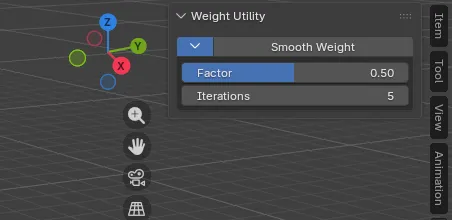
- 3D Viewport > Weight Paint > Sidebar (
Nkey) under theEdittab (Weight Utility).
Features & Usage
- Ensure the mesh has an Armature Modifier (or an Armature parent).
- Switch to Weight Paint mode.
- Run Smooth Weight from the Sidebar.
- If vertex selection is off, the first click turns it on and stops. Select vertices, then run again.
- With vertices selected, run again to smooth and normalize.
Parameters
| Parameter | Description |
|---|---|
| Factor | Blend amount toward neighbor averages each pass (0.0 to 1.0) |
| Iterations | Number of smoothing passes |
Left unchanged
- Weights on unselected vertices
- Locked vertex groups
- Non-bone deform vertex groups