Slide Relax
Blender 4.2+
Mesh Tool
Overview
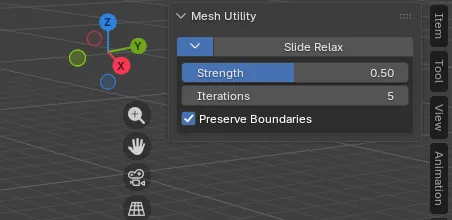
Slide Relax is a mesh editing tool that smoothly relaxes and evens out vertex spacing while retaining the overall surface volume and shape during Edit Mode. Excellent for retopology and organic modeling.
UI Location
- 3D Viewport > Edit Mode > Sidebar (
Nkey) under theEdittab.
Features & Usage
- Select vertices, edges, or faces in Edit Mode.
- Click Slide Relax in the Sidebar panel.
- Adjust Strength, Iterations, and Preserve Boundaries as needed.
Parameters
| Parameter | Description |
|---|---|
| Strength | Tangential relaxation amount per pass (0.0 to 1.0) |
| Iterations | Number of relaxation passes |
| Preserve Boundaries | Blocks inward motion on boundary vertices to avoid outline shrink |