UV Island Mask
Blender 4.2+
UV Editor
Overview
UV Island Mask bakes a mask image from the UV faces selected in the UV Editor. Selected faces are baked as white and the remaining faces as black. You can set the image resolution and bake margin for texture workflows.
UI Location
- UV Editor > Sidebar (
Nkey) >Edit
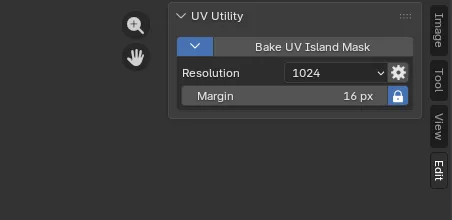
Features & Usage
- Select the UV faces to include in the mask in the UV Editor.
- Run Bake UV Island Mask from the
Editsidebar. - Adjust the resolution and margin as needed. The generated mask image is displayed in an Image Editor.
Key Highlights
- Generate a black-and-white mask image from selected UV faces
- Square or custom width and height resolution
- Configurable bake margin with automatic margin support